🚨 99% of IPTV Users Overpay… and Still Get Buffering
Most people think they’re getting a “good IPTV deal”…
Until:
- ⚠️ Channels start buffering during live matches
- ⚠️ “4K” streams look like 720p
- ⚠️ The service suddenly stops working after a few weeks
👉 The truth?
Choosing IPTV in 2026 is not about finding the cheapest price…
It’s about avoiding the biggest traps.
In this guide, you’ll learn how to pick a stable, high-quality IPTV service without wasting money.
💸 Why Cheap IPTV price Is Usually a Bad Deal
It’s tempting to go for $2–$5/month IPTV offers…
But here’s what usually happens:
- ❌ Overloaded servers → constant buffering
- ❌ Fake channel lists (thousands that don’t work)
- ❌ No support when things break
- ❌ Sudden shutdown after a short time
👉 Cheap IPTV = high risk
🧠 What IPTV Providers Don’t Tell You
Before choosing any IPTV service, understand this:
1. “4K Channels” Are Often Fake
Many providers claim 4K…
But in reality, they upscale low-quality streams.
👉 Always test before trusting.
2. Performance Drops During Peak Hours
A service may work perfectly during the day…
But at night (football matches, big events):
- buffering starts
- channels freeze
👉 This is the real test of quality.
3. Free Trials Can Be Misleading
Some providers:
- give you access to “premium servers” during trial
- then switch you to overloaded ones after payment
👉 Always test at different times.
📊 Cheap vs Premium IPTV (Real Difference)
| Feature | Cheap IPTV | Quality IPTV |
|---|---|---|
| Price | Very low | Medium |
| Stability | ❌ Unstable | ✅ Stable |
| Channels | Fake/duplicated | Real & working |
| Support | None | Available |
| Peak performance | Bad | Good |
👉 Paying a bit more often saves you frustration.
🔍 How to Choose the Right IPTV in 2026
Follow these proven steps:
✅ 1. Always Test First
Never buy without a trial.
Check:
- buffering
- channel loading speed
- image quality
Check your trial link with our Fast M3U iptv Checker
✅ 2. Test at Night (Very Important)
👉 This is where most IPTV services fail.
✅ 3. Don’t Trust “10,000+ Channels”
Quality > Quantity
A good service:
- has fewer channels
- but they actually work
✅ 4. Check Device Compatibility
Make sure it works on:
- Smart TV
- Android TV / Google TV
- Fire Stick
- PC
✅ 5. Look for Real User Feedback
Search on forums and communities.
If many users complain about buffering…
🚩 stay away.
⚡ Pro Tip: The Best Setup Matters More Than the Provider
Even a good IPTV service can perform badly if your setup is weak.
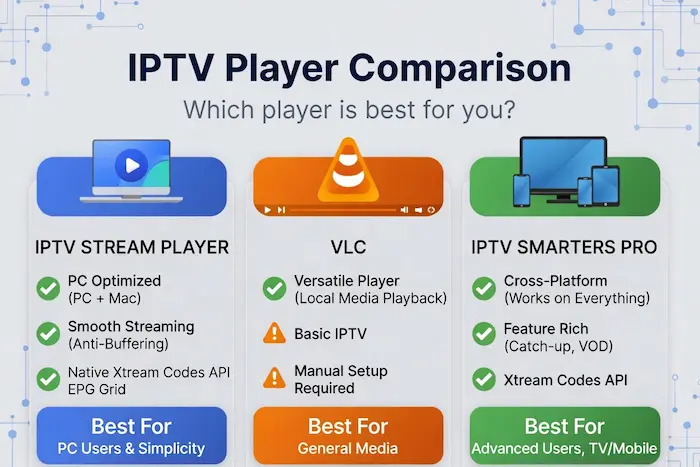
👉 For best performance:
- Use Ethernet instead of Wi-Fi
- Use a stable IPTV player
- Avoid overloaded apps
🎯 Final Verdict
Choosing IPTV in 2026 is simple:
👉 Don’t chase the cheapest option
👉 Focus on stability and real performance
Because in the end…
A cheap IPTV that buffers is more expensive than a stable one that just works.
❓ FAQ
What is a good IPTV price in 2026?
A reasonable IPTV service usually costs between $8–$15/month depending on quality and stability.
Why does IPTV buffer at night?
Because servers get overloaded during peak hours when many users are watching simultaneously.
Is free IPTV worth it?
Most free IPTV services are unstable, unsafe, or short-lived. Paid options are generally more reliable.
How can I test IPTV quality?
Use a free trial and check performance during peak hours, not just during the day.
🚀 Try a Stable IPTV Setup
If you want to avoid all the mistakes above…