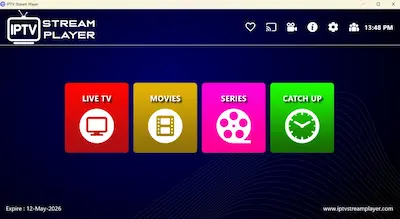
Most IPTV players fail when handling large playlists… they lag, freeze, or crash completely.
That’s exactly what I was struggling with—until I tested IPTV Stream Player.
After using it for several days on both PC and Mac, I noticed something different: smoother streaming, faster channel loading, and surprisingly stable performance even with large M3U lists.
In this guide, I’ll show you why IPTV Stream Player is becoming one of the best free IPTV players for PC in 2026—and whether it’s really worth using.
🚀 Why IPTV Stream Player(ISP) Stands Out
Unlike basic players like VLC (which lack EPG and proper IPTV features), ISP is designed specifically for IPTV users.
Here’s what makes it special:
✅ 1. Supports Large IPTV Playlists
One of the biggest issues with IPTV apps is crashing or lagging when loading large M3U files.
👉 ISP handles large playlists smoothly, making it ideal for premium IPTV services or heavy channel lists.
📺 2. Full EPG (TV Guide) Support
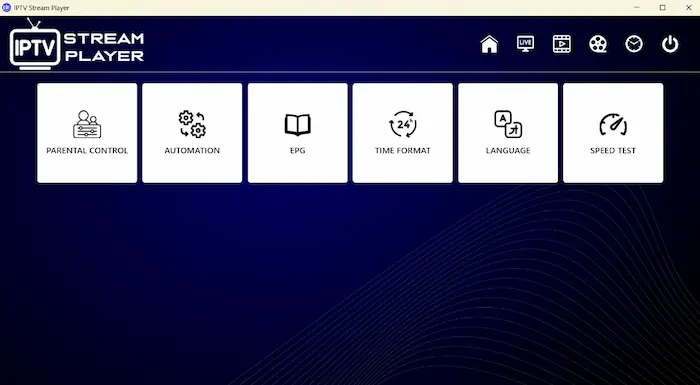
The app includes EPG integration, allowing you to:
- View current & upcoming programs
- Navigate channels easily
- Enjoy a real TV-like experience
This is something many free players lack.
🔒 3. Parental Control Features
A very underrated feature.
With built-in parental control, you can:
- Lock specific categories
- Hide adult content
- Protect kids from inappropriate channels
This makes it perfect for family use.
💡 Pro Tip: If your IPTV provider only gave you an M3U link, we recommend using our [Free IPTV M3U Checker & Xtream Converter] to ensure your links are active and to get your Xtream API details for a smoother setup in this player.
⚡ 4. Extremely Smooth Streaming (Less Buffering)
One thing I personally noticed:
👉 The app reduces buffering significantly compared to many IPTV players.
Thanks to its optimized player engine, it offers:
- Fast channel switching
- Stable playback
- Better handling of unstable streams
🌍 5. Multi-Platform Support (PC + Mac + Mobile)
Unlike many IPTV apps that are limited to one system, ISP works on:
- Windows PC
- macOS
- Android
- iPhone / iPad
It’s a true cross-platform IPTV solution.
🎬 6. Powerful Built-in Player
According to official app details, it supports:
- Multiple video formats
- 4K streaming
- Subtitles & dual audio
- Favorites & global search
- Speed test feature
⚠️ Things to Consider (Cons)
No app is perfect, and IPTV Stream Player has a few limitations I noticed during my testing:
- ❌ M3U Link Handling: It may struggle with direct M3U links in some cases; it is highly optimized for Xtream Codes API.
- ❌ No Local Playback: You cannot use it to play video files (MP4, MKV) stored locally on your PC.
- ❌ Minimalist Interface: While clean and fast, it may feel a bit “basic” compared to high-end premium IPTV apps.
👉 The Bottom Line: These limitations won’t affect the majority of users who rely on standard Xtream IPTV subscriptions.
📥 Download IPTV Stream Player
You can download the app from official stores:
- 🍏 iOS / Mac: https://apps.apple.com/ci/app/iptv-stream-player/id6479939671
- 🪟 Windows: https://apps.microsoft.com/detail/9pmrbqz7824h
- 🤖 Android: https://play.google.com/store/apps/details?id=com.arekjaar.iptvstreamplayer
⚠️ Important Note
Just like all IPTV players:
👉ISP does NOT provide channels
👉 You must add your own M3U playlist or Xtream Codes
This is a player only, not a content provider
💡 My Personal Experience
After trying apps like:
- VLC
- MyIPTV Player
- GSE Smart IPTV
I found that ISP offers a better balance between:
- Performance ⚡
- Simplicity 🎯
- Features 📺
Especially when dealing with large IPTV lists and EPG, it performs very well.
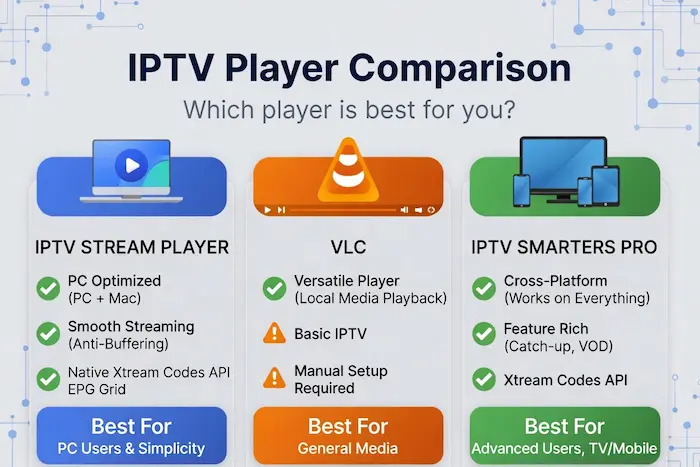
🆚 IPTV Stream Player vs Other Players
| Feature | IPTV Stream Player | VLC | Basic IPTV Apps |
|---|---|---|---|
| EPG Support | ✅ Yes | ❌ No | ⚠️ Limited |
| Large Playlist Handling | ✅ Excellent | ⚠️ Moderate | ❌ Poor |
| Parental Control | ✅ Yes | ❌ No | ❌ Rare |
| Buffering Optimization | ✅ Strong | ⚠️ Basic | ❌ Poor |
| Cross-Platform | ✅ Yes | ✅ Yes | ⚠️ Limited |
🔥 Final Verdict
If you want:
✅ Free IPTV player for PC
✅ Smooth streaming without buffering
✅ Support for large M3U playlists
✅ EPG + Parental Control
Then ISP is easily one of the best choices in 2026.
❓ Frequently Asked Questions (FAQ)
No. IPTV Stream Player is just a media player and does not include any channels.
To watch content, you need your own IPTV subscription such as an M3U playlist or Xtream Codes provided by a service.
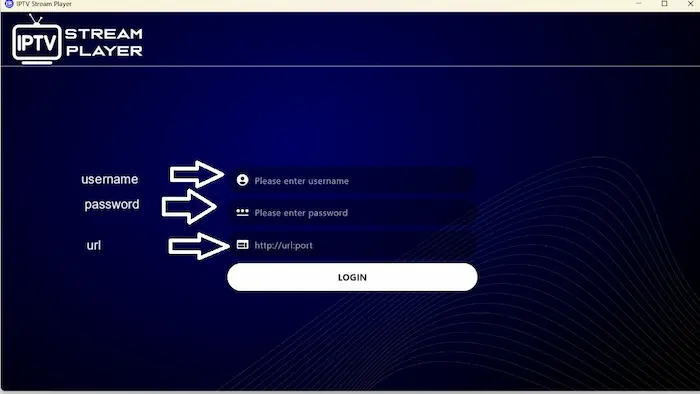
Setting up Xtream Codes is very simple. You just need to enter the following details:
Any Name: (Your choice)
Username
Password
Server URL
👉 Pro Tip: If your provider only gives you an M3U link, you can easily extract the Xtream Codes or check the server status using our IPTV Checker pro tool . This simplifies the login process and ensures your playlist is 100% active before adding it to the app.
Currently, IPTV Stream is available on:
Windows PC
macOS
Android
iOS
For Samsung or LG Smart TVs, you’ll need to use an external device like:
Amazon Firestick
Android TV Box
If your EPG (TV Guide) is not working, the issue is usually:
From your IPTV provider
Or the EPG needs a manual refresh
👉 Go to settings and refresh the EPG to fix the problem in most cases.
Yes, is safe as long as you download it from official sources like:
Microsoft Store
Apple App Store
Google Play
Avoid downloading APKs from unknown websites to stay protected.
5 Best Custom EPG Sources for IPTV (2026 Guide)