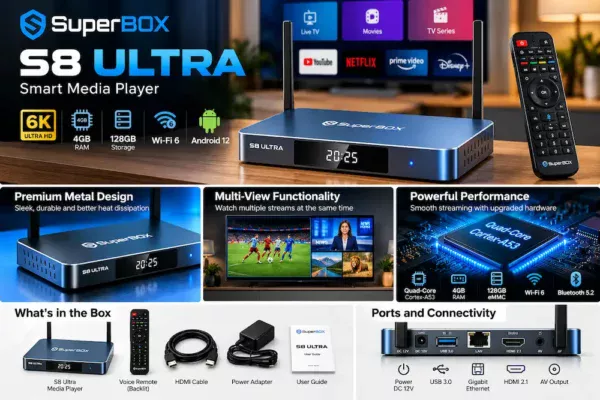
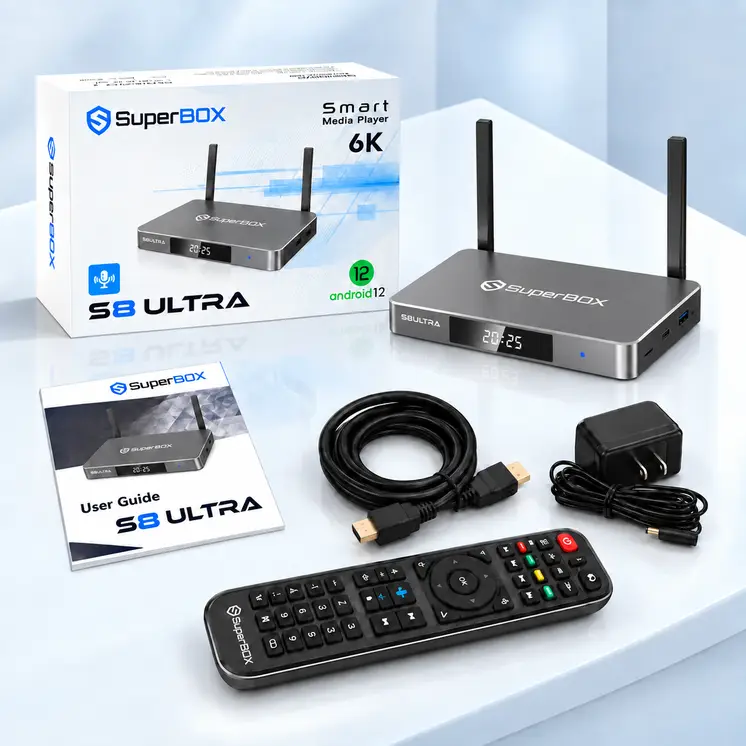
The SuperBox S8 Ultra is a premium Android streaming box listed at around $449, putting it well above many mainstream streaming devices. It combines 128GB of advertised internal storage, 4GB of RAM, a metal enclosure, wireless connectivity, and features such as multi-view and AI-assisted picture enhancement.
But does the SuperBox S8 Ultra offer enough practical value to justify its price? And how does it compare with established alternatives such as the Google TV Streamer and NVIDIA Shield TV Pro?
In this SuperBox S8 Ultra review, we examine its published specifications, connectivity, software features, potential limitations, legal considerations, and overall value.
read also :
What is IPTV?
Hisense Smart TV IPTV Setup: How to Set Up IPTV in 2026
Hisense vs Samsung vs LG vs TCL vs Sony: Which TV Is Best in 2026?
How to Add an EPG URL to Your IPTV Player | Complete XMLTV Guide
This is a specification-based review rather than a hands-on test, so performance claims that require independent testing are identified accordingly.
SuperBox S8 Ultra Specifications
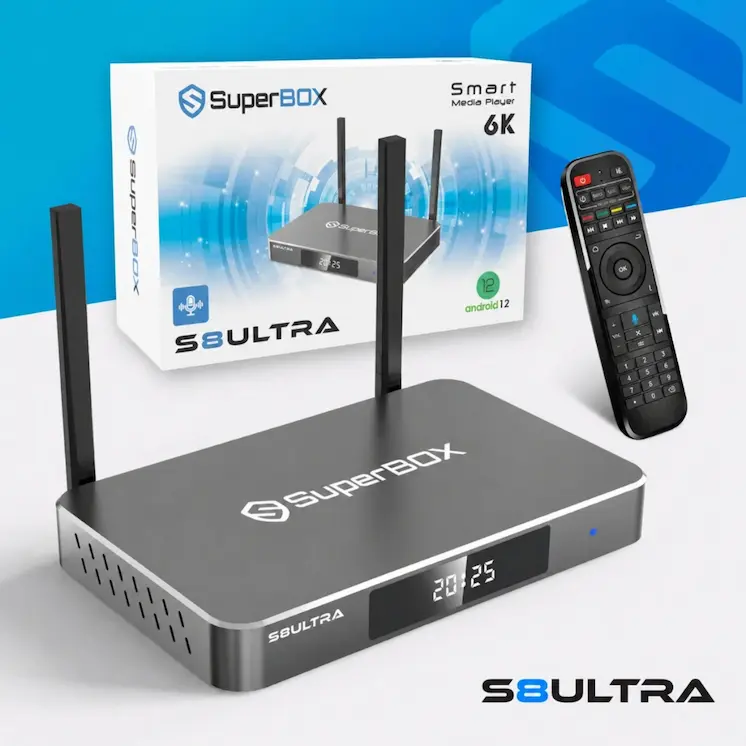
The SuperBox S8 Ultra is marketed as a flagship model in the SuperBox product lineup. Published retailer specifications describe a device built around an Android 12 platform, with expanded storage and a range of wired and wireless connections.
The following table summarizes the advertised hardware specifications. These details should be checked against the exact model and current manufacturer documentation before purchase.
| Feature | Advertised specification |
|---|---|
| Operating system | Android 12 |
| Processor | Quad-core ARM Cortex-A53 |
| Graphics | Mali-G31 MP2 GPU |
| RAM | 4GB DDR |
| Internal storage | 128GB eMMC |
| Video decoding | H.265, advertised up to 6K at 60fps |
| Wireless connectivity | Dual-band Wi-Fi 6 |
| Ethernet | Gigabit Ethernet, up to 1000Mbps |
| Bluetooth | Bluetooth 5.2 |
| USB | USB 3.0 |
| HDMI | HDMI 2.1, as advertised by a retailer |
| Enclosure | Metallic housing |
| Remote control | Backlit voice remote |
Specifications are based on published product listings and are not independently verified hardware test results.
A key distinction is that advertised video-decoding capability does not guarantee that every application or video source will play at the same resolution or frame rate. Actual results depend on codec support, software compatibility, the source itself, and the connected television.
Design and Build Quality
One of the distinguishing features of the SuperBox S8 Ultra is its metallic enclosure. Compared with compact plastic streaming sticks, a metal-bodied device can offer a more substantial appearance and may help dissipate heat.
However, the material alone does not establish how well a device manages temperatures during prolonged use. That would require thermal testing under a consistent workload.
Buyers should also consider the practical details of installation, including available space around the box, ventilation, cable access, and the location of the Ethernet connection.
If you plan to place the device inside a closed television cabinet, adequate airflow remains important regardless of the enclosure material.
Hardware Performance: What Can You Expect?
Processor and RAM
The advertised combination of a quad-core ARM Cortex-A53 processor and 4GB of RAM provides a useful starting point for evaluating the device.
RAM affects how applications are kept in memory and how comfortably a system handles multiple tasks. The processor influences application responsiveness, supported media formats, and overall computing performance.
Nevertheless, specifications alone cannot establish that the S8 Ultra is faster than competing streaming devices. That conclusion would require comparable measurements of application launch times, interface responsiveness, playback stability, and sustained performance.
The exact memory configuration should also be confirmed with the seller, because published listings do not always provide consistent detail about the RAM type.
128GB of Internal Storage
The S8 Ultra’s advertised 128GB of eMMC storage is one of its more noticeable hardware features.
For comparison, Google’s official specifications list 32GB of storage for the Google TV Streamer (4K). The S8 Ultra therefore advertises four times the nominal storage capacity.
More storage can be useful for applications, local media files, and other supported content. However, available space will be lower than the advertised capacity after the operating system and pre-installed software are accounted for.
Storage capacity is not the same as processing speed, and a larger storage figure does not automatically produce better streaming quality.
6K Video Decoding and 4K TVs
Some product listings advertise H.265 video decoding at up to 6K and 60 frames per second.
This specification needs to be interpreted carefully.
Video decoding describes the hardware’s ability to process a supported video format. It does not necessarily mean that every streaming application supports 6K output, that 6K content is available, or that the device can deliver better picture quality than a certified 4K streamer.
If you own a 4K television, the practical questions are whether the device supports the formats you use, whether your applications deliver the expected resolution, and whether HDR and audio features work correctly with your equipment.
For most buyers with a 4K television, verified 4K playback and reliable application support are more useful purchasing criteria than a headline 6K specification.
Connectivity: Wi-Fi 6 and Gigabit Ethernet
The S8 Ultra is advertised with dual-band Wi-Fi 6 and a Gigabit Ethernet connection.
Wi-Fi 6 can improve wireless network efficiency when used with compatible networking equipment. A wired Gigabit Ethernet connection can also provide a stable link between the streaming box and the local network.
Neither feature guarantees that buffering will disappear.
Streaming reliability depends on several factors:
- The speed and stability of your internet connection.
- The quality and availability of the streaming source.
- Wi-Fi signal strength and interference.
- Router performance and local network congestion.
- Application compatibility and device software.
If your router is near your television, Ethernet is worth considering for applications that benefit from a consistent connection. If a wired connection is impractical, a well-positioned Wi-Fi access point may be sufficient.
For troubleshooting, test the network connection separately from the application or content source. This makes it easier to identify whether a problem is related to connectivity or playback.
Voice Remote and Multi-View Features
Backlit Voice Remote
The S8 Ultra is advertised with a backlit voice remote. Backlighting can make buttons easier to identify in a dark room, while voice input can reduce the need to type searches with an on-screen keyboard.
Before buying, check which voice commands are supported, whether the microphone works across the applications you intend to use, and whether the remote can control your television’s power and volume.
These details can vary by implementation and should not be assumed from the presence of a microphone alone.
Multi-View Functionality
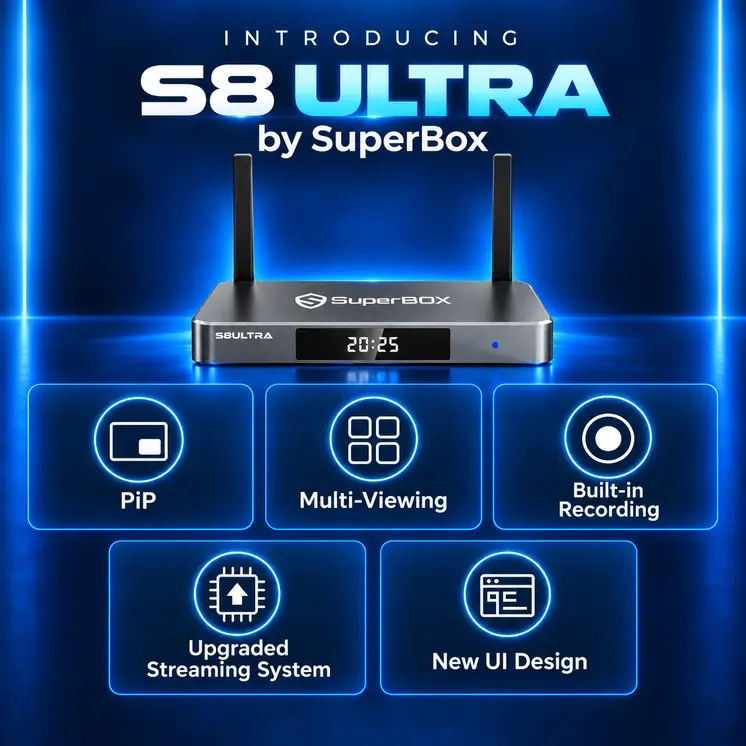
Multi-view is another advertised feature of the S8 Ultra. Depending on the software implementation, this type of feature can allow multiple supported video sources to appear on the same display.
Its practical usefulness depends on the number of simultaneous streams supported, the applications that work with the feature, and the processing and network resources required.
A multi-view label does not establish that every application can run simultaneously or that every combination of sources will work smoothly.
Buyers who consider multi-view essential should ask the seller for a demonstration using the specific applications and number of screens they intend to use.
Software, Applications, and Service Availability
The S8 Ultra is advertised as an Android-based streaming device, but the Android operating system alone does not guarantee the same experience as a Google-certified Android TV or Google TV product.
Application compatibility, access to official app stores, DRM support, software updates, and certification can differ between devices.
Before purchasing, verify the following:
- Whether the applications you need are supported.
- Whether popular subscription services provide the expected playback quality.
- Whether the device supports the required DRM and video standards.
- Whether security updates and firmware updates are available.
- Whether the manufacturer provides a clear support and warranty process.
If you mainly use licensed services such as Netflix, Prime Video, and YouTube, confirm compatibility directly rather than assuming that an application will work at its highest available resolution simply because the device runs Android.
It is also important to distinguish between applications installed on the device and the services that supply their content. An application can be installed while the availability, reliability, and licensing of its associated service remain separate issues.
Why Does the SuperBox S8 Ultra Cost Around $449?
The S8 Ultra’s listed price of approximately $449 places it in a premium segment of the streaming-device market.
Its advertised hardware includes 128GB of storage, 4GB of RAM, wireless networking, a metallic enclosure, and additional software features. These specifications help explain how the product is positioned, but they do not independently establish that its hardware is worth the asking price.
The overall value also depends on the software experience, application compatibility, update policy, warranty, and services included with the purchase.
Some buyers may be attracted by a one-time purchase model that is marketed as reducing recurring subscription costs. However, a purchase price should not automatically be interpreted as a guarantee of lifetime access to every application or content service.
Before buying, confirm:
- Exactly which applications and services are included.
- Whether any services require separate payments.
- What happens if an application or service stops working.
- How long the hardware warranty lasts.
- Whether the seller provides firmware updates and technical support.
- Whether the advertised services are appropriately licensed in your region.
These questions are especially important when the product’s price depends partly on the software ecosystem rather than hardware alone.
SuperBox S8 Ultra vs. Google TV Streamer vs. NVIDIA Shield TV Pro
Comparing the S8 Ultra with established streaming devices helps put its price and specifications into perspective.
| Feature | SuperBox S8 Ultra | Google TV Streamer (4K) | NVIDIA Shield TV Pro |
|---|---|---|---|
| Listed US price reference | About $449 | $99.99 at Google’s listed US price | Check current retailer pricing |
| Operating system | Advertised Android 12 | Google TV | Android TV, based on Android 11 |
| RAM | Advertised 4GB | 4GB | 3GB |
| Internal storage | Advertised 128GB | 32GB | 16GB |
| Maximum advertised playback | H.265 up to 6K decoding | Up to 4K | Up to 4K |
| Ethernet | Advertised Gigabit Ethernet | Built-in Ethernet | Gigabit Ethernet |
| Video features | Verify app-specific support | Dolby Vision and HDR10+, among other supported formats | Dolby Vision and HDR10 |
| Key consideration | Storage and advertised additional features | Google TV experience and mainstream streaming | AI upscaling, media features, and established platform support |
Specifications and prices are drawn from published product information. The S8 Ultra figures are advertised specifications, not independently tested results. Prices can change, and regional availability varies.
Google TV Streamer (4K): Best for Mainstream Streaming
The Google TV Streamer (4K) is a strong alternative for buyers who prioritize an established Google TV experience, supported streaming applications, and features such as Dolby Vision and Dolby Atmos.
Its listed US price of $99.99 is substantially below the S8 Ultra’s approximately $449 price.
The Google device offers less internal storage, but most people who primarily stream from licensed online services may not need 128GB of local storage.
NVIDIA Shield TV Pro: Best for Specific Advanced Media Needs
The NVIDIA Shield TV Pro remains worth considering for users who value features such as AI-enhanced upscaling, Gigabit Ethernet, USB expansion, and advanced media-server functionality.
NVIDIA lists 3GB of RAM, 16GB of internal storage, and support for up to 4K playback with compatible formats. Its official specifications also describe Dolby Vision and HDR10 support.
It does not match the S8 Ultra’s advertised storage capacity, but the comparison shows why storage alone should not determine which device offers better value.
Which Device Offers Better Value?
For buyers who mainly want to watch licensed streaming services on a 4K television, the Google TV Streamer is a more economical starting point.
The NVIDIA Shield TV Pro may be a better fit for users who need its specific media, connectivity, or upscaling features.
The S8 Ultra may appeal to buyers who specifically value its advertised storage capacity and multi-view features. However, its higher price is harder to justify without clear evidence of application compatibility, sustained performance, software support, and long-term service reliability.
Is the SuperBox S8 Ultra Legal?
The legality of a streaming device and the legality of the content accessed through it are separate questions.
An Android-based streaming box can be used for legitimate purposes, including running compatible applications, playing personal media, and accessing authorized streaming services.
The legal position can become different when applications or services provide access to copyrighted television channels, films, or sports broadcasts without the required authorization.
The relevant considerations include the content’s licensing, how it is distributed, the service’s authorization, and the laws that apply in the user’s country.
A pre-installed application does not automatically prove that all of its content is licensed. Likewise, the fact that a device can run third-party applications does not by itself establish that the hardware is illegal.
Before purchasing, users should check the legitimacy of included content services, review the provider’s terms, and use authorized sources. Legal consequences vary by jurisdiction and circumstances, so this section should not be treated as legal advice.
Potential Limitations to Consider
The S8 Ultra has several advertised features that may appeal to users, but buyers should weigh them against a few important uncertainties.
1. Premium pricing
At approximately $449, the device costs substantially more than the Google TV Streamer (4K). The additional storage and advertised features need to be genuinely useful to justify the difference.
2. Application compatibility
Android-based hardware does not guarantee that every major streaming service will work with full resolution, HDR, or other advanced features.
3. Limited independent performance evidence
Published specifications cannot replace independent tests of playback stability, temperature, responsiveness, and application compatibility.
4. Software support and updates
Buyers should verify the availability of security updates, firmware maintenance, and long-term support rather than assuming that the Android version alone guarantees ongoing compatibility.
5. Dependence on third-party services
Any additional content service may have its own availability, licensing, and support limitations. These should be evaluated separately from the device’s hardware.
Who Should Consider the SuperBox S8 Ultra?
The S8 Ultra may be worth investigating if you specifically need substantial advertised internal storage, want to explore its multi-view capabilities, and have verified that the applications you use are compatible.
It is less compelling if your main goal is straightforward access to mainstream streaming applications on a 4K television. In that situation, a lower-priced, well-supported streaming device may deliver better value.
Before making a decision, compare the total cost, supported applications, warranty, update policy, and service terms—not just the processor, storage capacity, or advertised resolution.
Final Verdict: Is the SuperBox S8 Ultra Worth It?
The SuperBox S8 Ultra is marketed as a premium Android streaming box with 128GB of internal storage, 4GB of RAM, Wi-Fi 6, Gigabit Ethernet, a metallic enclosure, and additional features such as multi-view.
Its specifications are attractive on paper, particularly for buyers who want more storage than mainstream streaming devices typically provide.
However, the advertised hardware does not establish that the S8 Ultra delivers better real-world streaming performance than less expensive alternatives. Its software compatibility, update policy, and included services are equally important to the purchasing decision.
For most people who simply want reliable access to licensed streaming applications, the Google TV Streamer (4K) is a more cost-effective choice. The NVIDIA Shield TV Pro is also worth considering for users who need its specific media features.
Our recommendation: Do not pay the S8 Ultra’s premium price based on headline specifications alone. Verify application compatibility, service licensing, warranty coverage, and ongoing software support first. If those details are unclear, a mainstream streaming device with a well-documented software ecosystem is the safer value-oriented choice.
Frequently Asked Questions
The S8 Ultra has been listed at approximately $449 on a US product page. Prices, promotions, shipping costs, and regional availability can change, so confirm the current total with the seller.
Retailer specifications advertise H.265 video decoding up to 6K at 60fps. This should not be interpreted as a guarantee that every application supports 6K output or that a 4K television will display native 6K content.
Published listings advertise 128GB of internal eMMC storage. The usable capacity will be lower after system software and pre-installed applications are accounted for.
The answer depends on the applications and services being used. Confirm which services are included, whether any require additional payment, and whether access is subject to service terms or availability changes.
Do not assume full compatibility from the Android operating system alone. Verify application availability, device certification, DRM support, and supported playback quality with the seller or service provider.
Not necessarily. The S8 Ultra advertises more internal storage, while the Google TV Streamer offers an established Google TV experience at a much lower listed US price. The better choice depends on the applications, features, and support you actually need.
It may suit buyers who specifically need its advertised features, but it is difficult to recommend at a premium price without independent performance evidence and clear information about long-term software support. Compare it with established alternatives before purchasing.
Editorial note: This review is based on published specifications and product information, not a hands-on test. Product specifications, pricing, application availability, and service terms may change. Verify current details before purchasing.
Disclosure: This article is for informational and educational purposes. It does not endorse unauthorized access to copyrighted content. Users should use legally authorized applications and streaming services and comply with applicable local laws.

