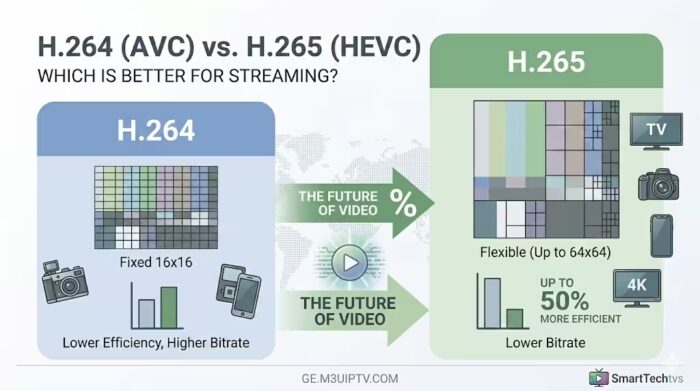
In the rapidly evolving world of digital video and IPTV, the debate between H.264 (AVC) and H.265 (HEVC) is more relevant than ever. Choosing the right codec is the difference between a crystal-clear 4K stream and a buffering nightmare.
Whether you are a content creator for SmartTechtvs, a webmaster for ge.m3uiptv.com, or a streaming enthusiast, this guide will break down the technical differences and help you choose the best standard for your needs.
1. What is a Video Codec?
A codec (Compression/Decompression) is a technology that shrinks large video files so they can be transmitted over the internet. Without codecs, streaming a movie would require massive bandwidth that most home connections couldn’t handle.
2. H.264 / AVC: The Universal Standard
H.264, also known as Advanced Video Coding (AVC), has been the industry standard since 2003. It powers everything from YouTube and Netflix to Blu-ray discs.
- Pros: Incredible compatibility. It works on almost every device, browser, and legacy smartphone.
- Cons: Less efficient for high resolutions like 4K or 8K, leading to larger file sizes.
3. H.265 / HEVC: The Efficiency King
H.265, or High Efficiency Video Coding (HEVC), is the successor to H.264. It was designed to solve the bandwidth problems of the Ultra-HD era.
- Pros: It offers up to 50% better data compression than H.264. This means you get the same video quality at half the bitrate.
- Cons: Requires significantly more processing power (CPU/GPU) to decode and encode.
Technical Face-Off: H.264 vs. H.265
| Feature | H.264(AVC) | H.265(HEVC) |
| Compression Efficiency | Standard | High (50% Improvement) |
| Bitrate Requirement | High (e.g., 32 Mbps for 4K) | Low (e.g., 15 Mbps for 4K) |
| Max Resolution | 4K | 8K |
| Hardware Support | Universal | Modern Devices (Post-2017) |
| Processing Method | Macroblocks ($16 \times 16$) | CTU (Up to $64 \times 64$) |
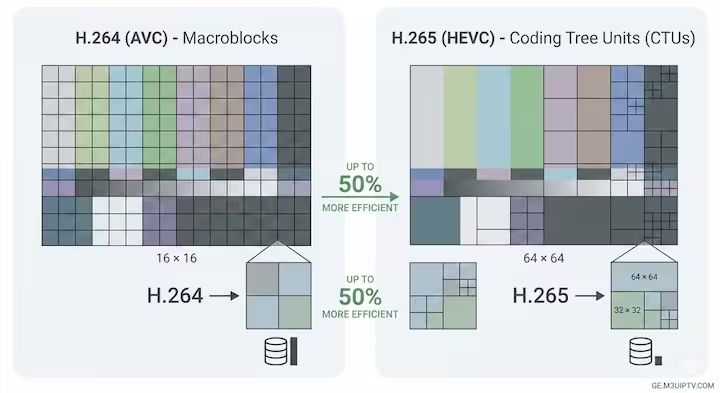
Why H.265 is Essential for Modern IPTV & 4K
The secret behind H.265’s superiority is Coding Tree Units (CTU). While H.264 uses small, fixed $16 \times 16$ macroblocks, H.265 uses larger, flexible blocks.
In a scene with a static background (like a sky), H.265 uses larger blocks to save data. In areas with high detail (like a person moving), it uses smaller blocks. This “intelligent” compression allows for much smoother streaming, especially on limited mobile data plans.
Which Codec Should You Use for Your Website ?
Choose H.264 (AVC) if:
- You want maximum compatibility across all user devices (old and new).
- You are doing low-latency live streaming where server-side processing power is limited.
- Your target audience uses older web browsers or budget smartphones.
Choose H.265 (HEVC) if:
- You are hosting 4K or HDR content.
- You want to save on bandwidth costs and storage space on your servers.
- You are targeting users with modern Smart TVs, iPhones, or high-end Android devices.
Conclusion: The Future is HEVC (and Beyond)
While H.264 remains the “safest” bet for universal playability, H.265 (HEVC) is the winner for quality and efficiency. As 4K becomes the new standard for IPTV and streaming platforms, adopting HEVC is no longer optional—it’s a necessity to stay competitive.
Useful Tools for IPTV Users:
- Test the health and status of your playlists with our best m3u iptv url checker .
- Verify your live stream links instantly using our free m3u8 checker online.
SEO Quick Tip for Webmasters:
When posting videos on your site, always provide an H.264 fallback for older browsers while prioritizing H.265 for modern users. This ensures the best “User Experience” (UX), which is a key ranking factor for Google.
Frequently Asked Questions (FAQ)
The primary difference is compression efficiency. H.265 (HEVC) offers up to 50% better data compression than H.264 (AVC). This means H.265 can deliver the same video quality at half the file size and bitrate, though it requires more processing power to decode.
H.265 (HEVC) is definitely the better choice for 4K streaming. Because 4K files are massive, H.265 uses large, flexible Coding Tree Units (CTUs) to compress data intelligently, preventing buffering and saving bandwidth on your servers.
No. While H.264 is the universal standard and works on almost every legacy device and browser, H.265 requires modern hardware (typically post-2017), such as newer Smart TVs, iPhones, and high-end Android devices, to decode smoothly.
It depends on your audience. Use H.264 for maximum compatibility across older browsers and budget devices. Choose H.265 if you are prioritizing Ultra-HD (4K/HDR) quality, looking to save on server storage, and targeting users with modern devices. For the best UX, provide an H.264 fallback option.
Found this guide helpful? Visit our blog for more insights into IPTV technology, SEO tips, and the latest hardware reviews!