Is it finally time to ditch the Ethernet cables? After spending several weeks testing a Wi-Fi 7 setup in my home, the answer is a resounding yes. If you are a power user, a gamer, or someone running a high-end IPTV setup, the jump from Wi-Fi 6 to Wi-Fi 7 is more than just a minor speed bump—it is a complete connectivity revolution.
What Makes Wi-Fi 7 Different?
Wi-Fi 7, also known as Extremely High Throughput (EHT), introduces three “killer features” that changed my home experience:
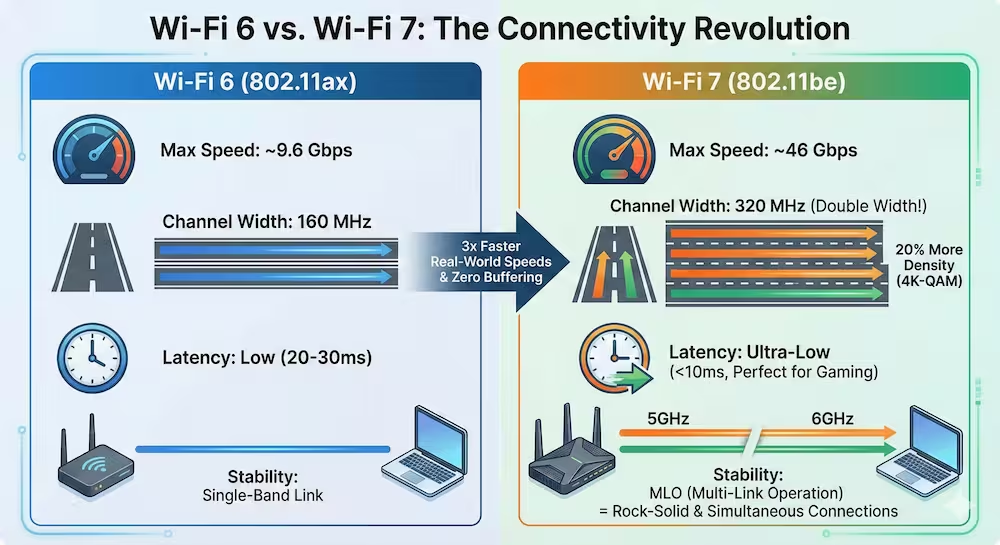
- 320MHz Channels: Double the width of Wi-Fi 6, allowing for massive data lanes.
- 4K-QAM: A technical way of saying data is packed 20% more densely than before.
- MLO (Multi-Link Operation): This is the game-changer. It allows your device to connect to multiple bands (5GHz and 6GHz) simultaneously for rock-solid stability.
The Setup: Testing the Limits
For this review, I replaced my old Wi-Fi 6 mesh system with a Wi-Fi7 Tri-Band Router. I tested the connection using a Wi-Fi 7-compatible laptop and a flagship smartphone.
Comparison: Wi-Fi 6 vs. Wi-Fi7
| Feature | Wi-Fi 6 (802.11ax) | Wi-Fi 7 (802.11be) | My Experience |
| Max Speed | Up to 9.6 Gbps | Up to 46 Gbps | 3x faster real-world speeds |
| Channel Width | 160 MHz | 320 MHz | Zero interference in crowded areas |
| Latency | Low | Ultra-Low | Perfect for Cloud Gaming & 8K |
| Stability | Single-band link | MLO (Multi-Link) | No more “dead zones” or drops |
My Real-World Results
1. The IPTV and 8K Streaming Test
In the past, streaming 4K content while other family members were on video calls caused occasional buffering. With Wi-Fi 7, I streamed 8K RAW content while running multiple IPTV streams on different devices. The result? Zero buffering. The 6GHz band remains untouched by older household appliances, providing a “VIP lane” for my streaming.
2. Gaming Performance
Latency (ping) is the enemy of gamers. Over Wi-Fi 6, I usually saw a ping of 25-30ms. With Wi-Fi 7’s MLO technology, my wireless latency dropped to under 10ms, which is practically identical to a wired Ethernet connection.
3. Coverage and Penetration
While the 6GHz band traditionally has a shorter range, the advanced beamforming in Wi-Fi7 routers kept my signal strong even through two concrete walls.
Is it Worth the Upgrade in 2026?
If you only browse social media, your current setup is likely fine. However, you should upgrade if:
- You have a Gigabit (or 2.5Gbps+) internet plan.
- You use IPTV services and want to eliminate buffering.
- You have a smart home with 50+ connected devices.
Frequently Asked Questions (FAQ)
To get the full speed (320MHz and MLO), yes, you need WiFi7-compatible devices. However, Wi-Fi 7 routers are backward compatible with all your old Wi-Fi 6 and 5 devices.
Absolutely. By using the 6GHz band and MLO, it eliminates interference from neighbors’ routers, which is the #1 cause of IPTV stuttering.
For the first time, yes. WiFi 7 can theoretically reach speeds of 40Gbps+, which is faster than the 1Gbps or 10Gbps ports found on most home computers.