Introduction
You’ve just set up your favorite IPTV player—be it SmartOne or TiviMate—and you’re ready to watch the big game. But suddenly, the screen freezes. You check your internet speed, and it’s fast. So, what’s the problem?
In 2026, the answer is almost always ISP Throttling or Geo-blocking. This is where a VPN (Virtual Private Network) becomes your most important streaming tool. In this comprehensive guide, we’ll break down what a VPN is, why it’s vital for your security, and how it can transform your IPTV experience from “buffering” to “blazing fast.”
What is a VPN? (The 2026 Definition)
A VPN, or Virtual Private Network, is a service that creates a secure, encrypted “tunnel” between your device (Smart TV, Firestick, or Phone) and the internet.
Think of it like driving your car through a private underground tunnel instead of a public highway. On the highway, everyone (including your Internet Service Provider) can see where you’re going and what you’re carrying. Inside the tunnel, you are invisible and protected.
Key Technical Components in 2026:
-
Military-Grade Encryption: Modern VPNs use AES-256 or the newer Post-Quantum Encryption to ensure your data is unreadable by hackers.
-
WireGuard 2.0 Protocol: In 2026, this is the industry standard. It’s significantly faster than older protocols, making it perfect for 4K and 8K IPTV streaming.
The Role of VPN in Protection & Security
Beyond streaming, a virtual private network is your digital shield. Here’s how it protects you:
-
IP Masking: A VPN hides your real IP address and replaces it with one from a server location of your choice. This prevents websites and malicious actors from tracking your physical location.
-
Data Encryption: All your online activity—passwords, personal info, and browsing history—is encrypted, making it safe to use even on public Wi-Fi networks.
-
Privacy from ISPs: Your Internet Service Provider (ISP) can no longer monitor which apps you use or what content you stream.
Why a virtual private networkis Essential for IPTV (The “Secret” to Smooth Streaming)
If you are serious about IPTV, a VPN is not optional. Here is why:
1. Bypassing ISP Throttling (The Buffering Killer)
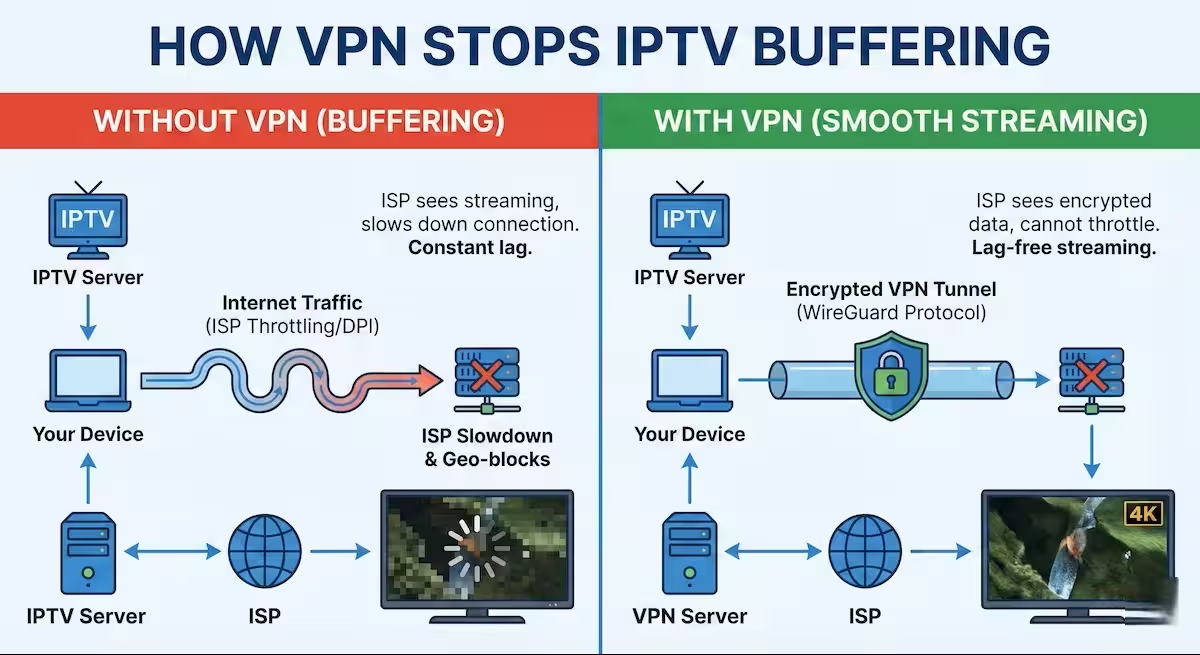
Many ISPs use Deep Packet Inspection (DPI) to identify IPTV traffic. When they see you are streaming high-bandwidth content, they intentionally slow down your speed to save their network resources. A VPN encrypts your traffic so the ISP can’t see you’re using IPTV, allowing you to enjoy your full internet speed.
2. Unlocking Geo-Restricted Content
Want to watch a sports event only available in the UK or a news channel from the US? By connecting to a VPN server in that country, you bypass geographical “blackouts” and access a world of content that was previously blocked in your region.
3. Legal Privacy & Safety
While IPTV itself is a technology, some providers may operate in “gray areas.” A VPN ensures that your streaming habits stay private, protecting you from potential legal notices or copyright infringement claims in certain jurisdictions.
What’s Next? (Our 2026 VPN Series)
This is just the beginning. To help you get the most out of your setup, we have created dedicated guides for every step of your journey:
-
[How to Set Up a VPN on Samsung & LG Smart TVs]: Step-by-step instructions for Tizen and webOS.
-
[Top 5 Cheapest & Most Reliable VPNs for 2026]: High performance that won’t break the bank.
-
[Setting Up a VPN on Your Router]: The ultimate way to protect every device in your home.
Frequently Asked Questions (FAQ)
1. Will a VPN slow down my IPTV streaming speed? While older VPNs used to cause lag, in 2026, using the WireGuard 2.0 protocol actually helps. If your ISP is throttling your connection, a VPN can improve your speed by hiding your traffic, ensuring a smooth 4K or 8K experience.
2. Is it legal to use a VPN for IPTV? Yes, using a VPN is a legal way to protect your online privacy and secure your data. However, you should always ensure that the content you are streaming through your IPTV provider complies with the copyright laws in your specific region.
3. Can I use a free VPN for streaming? We strongly advise against free VPNs for IPTV. Most free services have data caps, slow servers, and may sell your browsing data. For a professional setup on high-end TVs, a premium, “no-logs” VPN is the only reliable choice.
4. Do I need a VPN if my IPTV service is already “encrypted”? Yes. Even if your provider uses encryption, your ISP can still see that you are connecting to an IPTV server and may throttle your speed. A VPN hides the “destination” of your traffic entirely, providing an extra layer of both speed and security.
5. How do I use a VPN on a Samsung or LG Smart TV? Since these TVs do not support VPN apps directly, the best way is to install the VPN on your Router or use a Smart DNS service provided by your VPN vendor. This protects every device in your home, including your high-end television.
Summary
In 2026, a virtual private network is the bridge between a frustrating, lagging stream and a premium cinematic experience. It provides the Security you need and the Speed you deserve.