⚠️ Crucial Clarification First
Before we begin, it is vital to understand that TiviMate is a premium IPTV player application for Android TV and Fire TV devices. It does NOT provide any TV channels or content. You must supply your own IPTV service subscription (via an M3U playlist or Xtream Codes login) to use it.
What is TiviMate?
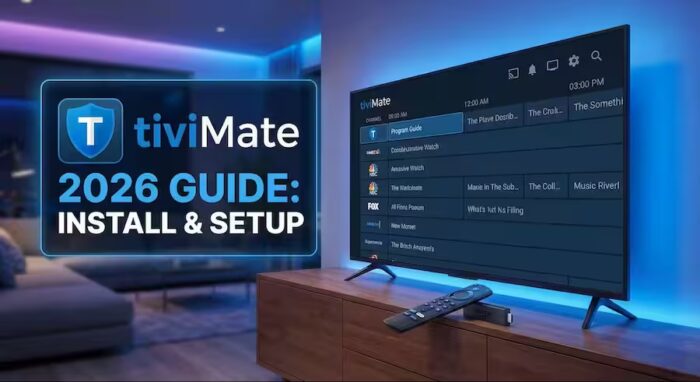
TiviMate is an IPTV player designed to manage and watch live TV channels from your existing providers. Think of it as a supercharged TV guide or a premium dashboard that replaces the clunky apps often provided by IPTV services. It is highly customizable and built specifically for a seamless, cinematic experience on large screens.
1. Free Version vs. Premium (Paid) Version
While you can use TiviMate for free, it comes with significant limitations:
-
Free Version: Allows adding only one playlist, has no recording functionality, and offers limited interface customization.
-
Premium Version: Unlocks the app’s full potential, including multiple playlists, scheduled recordings, and advanced UI tweaks.
2. Official Pricing & Plans (2026 Update)
The only recommended and official way to purchase a license is through the TiviMate Companion app.
| Plan Type | Estimated Price (USD) | Best For |
| Single Device (Annual) | ~$8.99 / year | Testing the service |
| Single Device (Lifetime) | ~$24.99 | One-room setup |
| Five Devices (Annual) | ~$14.99 / year | Average household |
| Five Devices (Lifetime) | ~$39.99 | Best Value for families |
Key Note: The “Lifetime” license applies to the current major version (e.g., 4.x). While a new version (5.0) might require a new purchase in the future, the developer has not implemented such a change yet.
Mastering the EPG: TiviMate’s Secret Weapon
One of the main reasons streamers choose TiviMate is its professional Electronic Program Guide (EPG). TiviMate organizes your content into a beautiful, grid-style TV guide that looks exactly like high-end cable or satellite TV.
Why TiviMate’s EPG is Superior in 2026:
-
Automatic Updates: Premium users get EPG updates in the background so you always know what’s playing.
-
Multiple EPG Sources: You can link several EPG URLs to a single playlist if your provider’s guide is incomplete.
-
Customizable Layout: Adjust font size, colors, and the “look-back” time for catch-up TV.
-
Seamless Integration: Perfectly maps channel logos and program descriptions for a professional-grade dashboard.
💡 Quick Tip: For the best EPG experience, we recommend using Xtream Codes when adding your playlist. It automatically links the EPG data without needing a separate URL.
👉 Generate XMLTV EPG from your M3U link in one click
Don’t have an EPG URL yet? You can choose the right one for your country from our 👉 free EPG TV lists.
3. Prepare Your Firestick for Installation
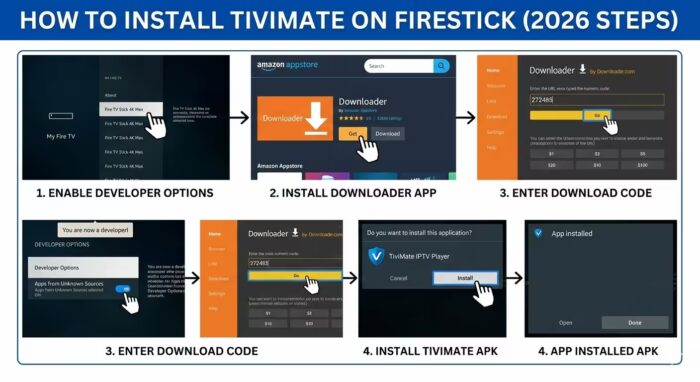
Since TiviMate isn’t in the official Amazon store, you must enable “Sideloading”:
-
Go to Settings > My Fire TV > About.
-
Click on your Device Name 7 times to unlock Developer Mode.
-
Go back to Developer Options and turn Apps from Unknown Sources to ON.
4. How to Install TiviMate (Step-by-Step)
-
Install Downloader: Search for “Downloader” in the Amazon Appstore and install it.
-
Enter the Code: Open Downloader and type the official downloader code
272483to download the official TiviMate APK. -
Install & Clean Up: Once downloaded, click Install. Afterward, delete the APK file to save space on your Firestick.
5. How to Purchase & Unlock Premium (Official Steps)
Follow these steps to upgrade safely:
-
On your phone (Android/iOS): Install the TiviMate Companion app.
-
Create an Account: Open the Companion app and sign up with your email.
-
Select & Pay: Choose your desired plan and pay securely via Google Pay or Apple Pay.
-
Unlock on TV: Go to the TiviMate app on your TV, navigate to Settings > Unlock Premium, and log in with the same credentials.
⚠️ Critical Warnings: Avoid the Scams
-
No Official Website: There is NO website (like tivimate.com) to buy licenses directly. Any site claiming this is a scam.
-
Avoid Third-Party Sellers: Never buy “lifetime keys” or “cracked versions” from eBay or forums; these are often revoked and insecure.
-
Payment Methods: The official app does NOT accept PayPal, Alipay, or Crypto. It only uses official App Store payment systems.
-
Try Before You Buy: Always test the free version first to ensure compatibility with your IPTV provider.
Frequently Asked Questions (FAQ)
No, TiviMate is a premium IPTV player specifically designed for Android TV, Android boxes, and Fire TV devices. It is not compatible with Samsung (Tizen) or LG (webOS) systems.
No, TiviMate is strictly a media player and does not provide any channels, content, or IPTV services. To use it, you must already have a subscription to an IPTV provider.
The official pricing plans offer options for either a single-device license or a five-device license. Each “device” counts as one login on an Android or Fire TV device.
Amazon’s store does not host TiviMate, which is why users must “sideload” the application using a utility like the Downloader app.
The official method requires the TiviMat app Companion app, which is available on the Google Play Store for Android phones. This app is necessary to process the payment and manage your devices.
No, the recording functionality is a premium feature. You must upgrade to the paid version to schedule or record live TV.
Summary
TiviMate remains the gold standard for IPTV in 2026. A lifetime license for 5 devices (~$40) is the best investment for a professional-grade viewing experience. Always use the TiviMate Companion app to stay safe.
Really glad you led with the clarification that TiviMate ships with zero channels — I see so many people buy a “TiviMate lifetime key” on eBay thinking they’re buying a channel subscription, so your scam warning section is genuinely valuable. Your pricing table is spot-on for 2026: the ~$40 five-device lifetime is by far the best value if you have more than one TV. One small tip that pairs with your Xtream Codes advice: when a provider’s EPG is thin, adding a secondary XMLTV source to the same playlist fixes the “No Information” gaps without touching anything else. And if anyone reading is still comparing TiviMate against other live TV apps before paying, the comparison at inatboxapp.tr (https://inatboxapp.tr/) is a useful resource to bookmark. Thanks for keeping the Downloader code (272483) updated too — that changes more often than people think.