Deploying advanced broadcasting formats on Apple’s iOS ecosystem requires a precise understanding of stream rendering paths and application layers. Unlike open architectures, setting up custom video streams on an iPhone demands compatible application proxies that cleanly parse data feeds without straining system memory. In 2026, optimization of these network playlists is crucial to prevent buffering and ensure endpoint stability.
This structural deployment guide provides an architectural breakdown of integrating secure multimedia tokens, managing container profiles, and establishing baseline diagnostics on iOS frameworks.
1. Establishing the iOS Media Player Layer
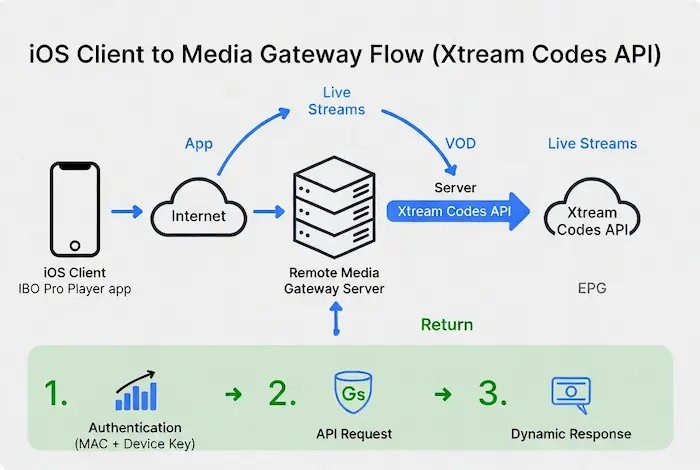
Because iOS does not natively parse dynamic broadcast manifests through its default player framework, utilizing a dedicated network application layer is required. These specialized utility tools decode transport streams (HLS, TS) and translate raw metadata into fluid video frames.
The leading architectural interfaces deployed on the iOS infrastructure include:
- IPTV Smarters Pro: Optimized for dynamic endpoint polling and flexible JSON parsing. You can deploy it via the official Apple App Store for IPTV Smarters.
- ibo Pro Player: Highly recognized for its server-side activation capabilities and lean rendering footprint. Download the official container through the Apple App Store for ibo Player.
- GSE Smart IPTV: A powerful structural interface embedded with extensive dual-engine player options.
Comparative Protocol Evaluation: Manifest Formats
Before initializing a connection profile inside your iOS environment, it is necessary to examine the payload architecture provided by your diagnostic infrastructure provider:
| Streaming Protocol | Structural Payload Base | Network Footprint |
|---|---|---|
| Extended M3U Playlist | Plaintext Lines & String Attributes | High Overhead (Downloads total map) |
| Xtream Codes API | Asynchronous JSON Data Objects | Ultralight (On-demand data queries) |
2. Analyzing Media Stream Authentication Assets
To successfully hook an iOS media decoder into a remote broadcast grid, network configuration assets are deployed via three structural methodologies. Prior to launching these configurations inside an untested software sandbox, validating network path endpoints via our Online Stream Diagnostics Platform ensures that connection timeouts are mitigated before any data is transferred to the mobile chip.
Methodology A: Plaintext M3U Vectors
A sequential list of target streams bound into an active text file. The system relies on query parameter syntax to handshake access gates:
http://demo-server.com/get.php?username=sample_user&password=sample_pass&type=m3u_plusMethodology B: Structured Xtream API Arrays
Instead of importing a heavy plain text database, you can communicate with server clusters through explicit endpoints. This structural integration utilizes secure query segments which you can analyze deeply in our detailed architectural breakdown on decoding player_api.php server logs.
- Host Port Target:
http://demo-server.com:8080 - User Object Identifiers:
user123 - Security Key Token:
pass123
3. Step-by-Step Profile Deployment inside iOS Modules
Configuration Suite: IPTV Smarters Integration
- Initialize the verified core container on your iPhone device.
- Navigate to the data management cluster and select Add User.
- Choose between loading a raw text string or executing an asynchronous database integration via Login with Xtream Codes API.
- Input your assigned diagnostic server variables cleanly into the parameters fields.
- Execute Add User to compile the endpoint map.
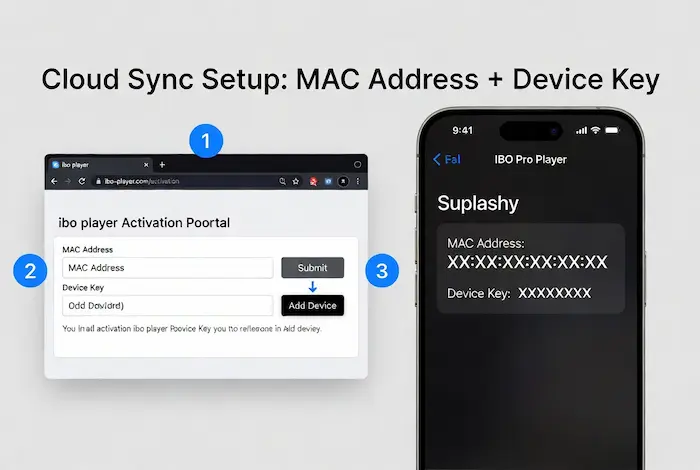
Configuration Suite: ibo Pro Player Cloud Sync
- Launch the interface on your iOS hardware layer.
- Document the hardware tokens shown on the core screen: the device physical MAC Address and the associated Device Key.
- Access the secure web deployment dashboard provided by the application infrastructure.
- Map your target data loops or remote portal URLs directly into their cloud management panel.
- Perform a hard refresh of the local app container on your mobile terminal to pull down the synchronized profile.
4. Verifying Output Datastreams
When the internal client engine resolves the payload parameters successfully, the iOS interface populates the unified media environment. This structure segregates network streams into independent nodes for targeted indexing:
- Live Telemetry Feeds: Immediate stream connections operating through active media endpoints.
- Video on Demand (VOD Assets): Unicast storage data modules mapped for standalone playback.
- Electronic Program Guide (XMLTV Engines): The dynamic synchronization layer displaying metadata and channel timelines.
Engineering Diagnostics for Optimal Playback
To eliminate packet loss and maintain packet stability on hardware running iOS 19 or related mobile microarchitectures, adhere to these explicit networking guidelines:
- Wi-Fi Infrastructure: Rely strictly on 5GHz localized dual-band routers to facilitate clean buffer loops.
- Gateway Restrictions: If connection handshake failure states manifest, run an edge proxy or configure a residential DNS alternative to bypass localized ISP port filtering blocks.
- Application Longevity: Consistently run the latest compilation bundles from the App Store to maintain patch defense standards against protocol memory leaks.
Frequently Asked Questions
Why do some streams fail to render sound on iOS?
This is commonly caused by hardware decoding mismatches. Many iOS multimedia players require manual toggle switches inside settings to convert raw audio tracks via software decoders instead of device hardware limits.
Does changing the streaming application clear local caches?
Yes, uninstalling the container clears accumulated buffer profiles, restoring default network configurations and freeing device memory allocations.
Technical Baseline Disclaimer
This analytical document serves educational network profiling and streaming infrastructure validation purposes exclusively. This site does not distribute, host, or commercialize private digital access keys or video streaming properties.
Frequently Asked Questions (FAQ) — iOS Stream Diagnostics
This is commonly caused by hardware audio decoding mismatches. Many iOS multimedia players require manual toggle switches inside settings to convert raw audio tracks (like AAC or AC3) via software decoders instead of device hardware limits.
Yes, completely uninstalling the application container flushes accumulated media buffer profiles. This restores default network configurations and frees device memory allocations on your iPhone.
To avoid manual timeout overloads, it is recommended to run the link through an external multi-threaded framework. You can check the current status and token lifespan using our automated media token expiration detection framework to ensure the server is fully responsive.
An HTTP 401 code indicates that your authentication parameters (username or security password token) are incorrect or have been suspended by the destination media gateway server.